Both systems bring live channels to your screen, but they travel in very different ways. Satellite TV uses a dish on the roof and a receiver. IPTV uses the internet connection you already pay for. Which one fits depends on your home, your connection and what you like to watch.
Disclosure: WatchingStream is published by the same team that runs Velora4K, Mom IPTV and RobotIPTV. We apply the same criteria to each one and take the details from their own pages. Check prices and terms on each site before you buy.
How each system delivers TV
A satellite service beams channels from a satellite to your dish, and a receiver decodes them. IPTV sends the same kind of channels as data over your broadband line to a player app. If the idea is new to you, what IPTV is covers the basics.

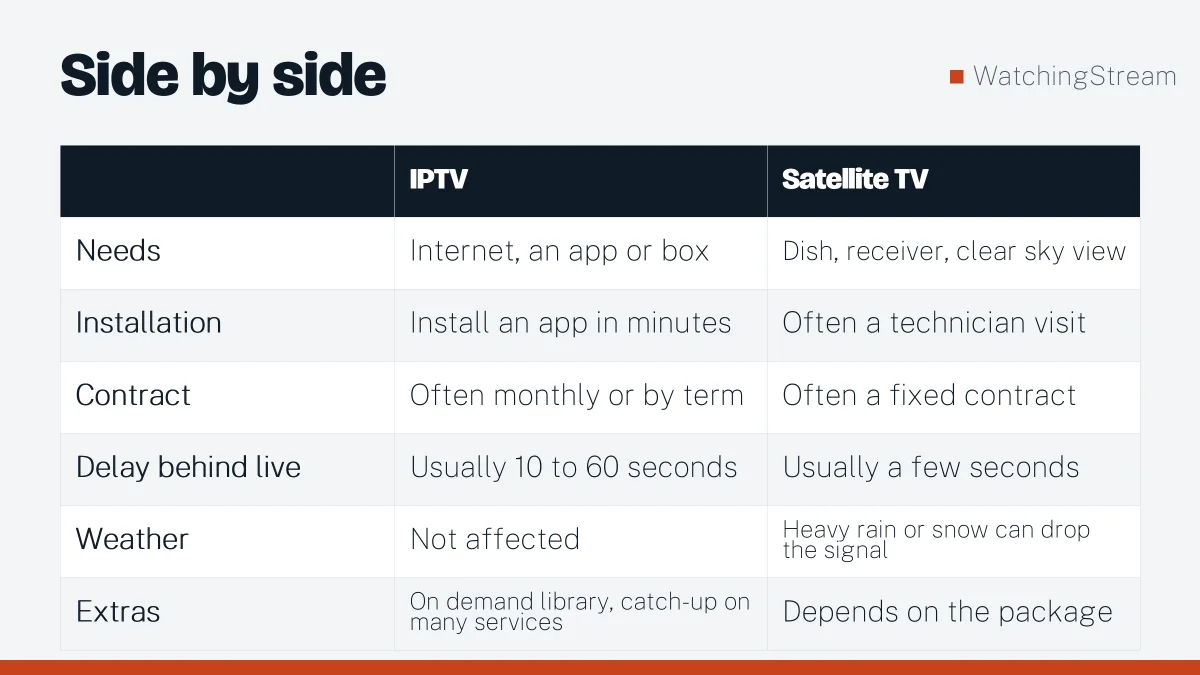
Side by side
| IPTV | Satellite TV | |
|---|---|---|
| Needs | Internet, an app or box | Dish, receiver, clear sky view |
| Installation | Install an app in minutes | Often a technician visit |
| Contract | Often monthly or by term | Often a fixed contract |
| Delay behind live | Usually 10 to 60 seconds | Usually a few seconds |
| Weather | Not affected | Heavy rain or snow can drop the signal |
| Extras | On demand library, catch-up on many services | Depends on the package |
Cost
Satellite packages often include equipment, installation and a contract term. IPTV services are commonly sold month to month or in blocks of three, six or twelve months, and the monthly price is often lower. For example, Mom IPTV lists plans from $14 for one month, while Velora4K starts at $29.99 for three months. Prices change, so confirm on the provider page. Add the cost of a decent router if yours is old.
Picture quality and delay
Satellite gives a steady picture with a small delay. IPTV can match it on a good connection, and many services offer HD and 4K. The trade-off is delay: live sports on IPTV can run behind the broadcast, so a goal may reach your phone before it reaches your screen.
Reliability
Satellite is exposed to heavy weather. IPTV is exposed to your internet line and your Wi-Fi. A wired connection and a router that handles several streams remove most problems. Our router guide explains what to look for.
When satellite still makes sense
- Your home has slow or unstable broadband.
- You live in a rural area with a clear view of the sky.
- You want the smallest possible delay on live events.
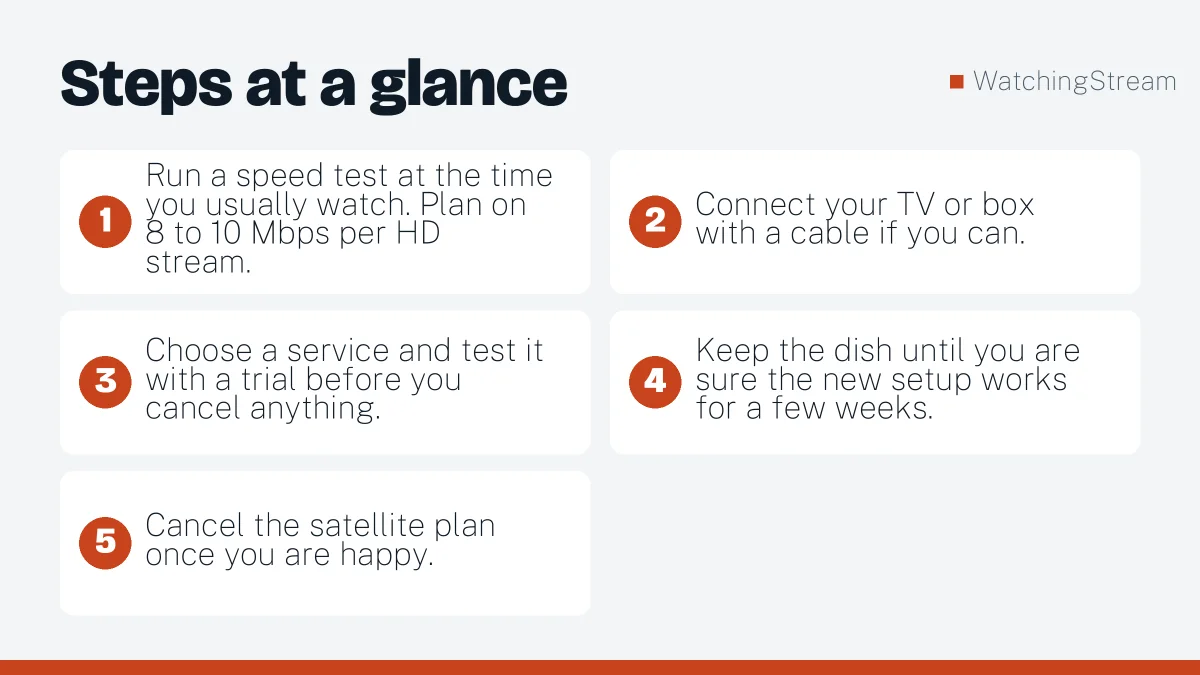
How to switch from satellite to IPTV
- Run a speed test at the time you usually watch. Plan on 8 to 10 Mbps per HD stream.
- Connect your TV or box with a cable if you can.
- Choose a service and test it with a trial before you cancel anything.
- Keep the dish until you are sure the new setup works for a few weeks.
- Cancel the satellite plan once you are happy.
If you want to compare services, how to compare IPTV providers gives a checklist.

Frequently asked questions
Is IPTV better than satellite TV?
Not always, because each one wins in a different situation. IPTV is flexible, usually cheaper per month, easy to set up and works on any screen with an app. Satellite is steadier where internet is weak and has a smaller delay behind live events. Choose IPTV if you have a solid broadband line and want one service on every screen, and choose satellite if your connection is unreliable.
Does IPTV work during storms?
Weather does not affect IPTV directly, which is one of its advantages over a dish. Heavy rain or snow can weaken a satellite signal, but IPTV only needs your internet line. The weak spot is the line itself: a damaged phone or cable connection, a power cut that stops your router, or a busy network can still interrupt the stream. A small battery backup for the router is a cheap way to protect against short outages.
Can I keep my dish and add IPTV?
Yes, and many households do exactly that while they test. Keeping the dish gives you a fallback, so a bad evening on your internet line does not leave you without TV. After a few weeks you will know whether IPTV covers what you watch and how it behaves at peak times. Then you can cancel satellite with confidence. See how to use a free trial to test properly.
What speed do I need to replace satellite?
Plan for about 8 to 10 Mbps for each HD stream and around 25 Mbps for 4K. Multiply that by the number of screens that may run at the same time, then add some room for phones, laptops and updates in the house. A cable to the main TV removes most Wi-Fi trouble. If your line is close to the limit, a better router often helps before you pay for a faster plan.